Questions & answers
Frequently asked questions
Common questions about MapleCabinet. Have something else? Email [email protected].
What is MapleCabinet?
MapleCabinet is a Canadian-hosted document management platform: an encrypted vault for your business files with full-text search, version control, granular sharing, and audit-ready retention. Think of it as your filing room - but searchable, shareable, and stored in Canada under PIPEDA.
How is MapleCabinet different from Google Drive, Dropbox, or Box?
MapleCabinet keeps every file in Canadian datacenters under PIPEDA - Google Drive, Dropbox, and Box all replicate to US infrastructure. We also bundle audit trails, legal hold, OCR over scanned PDFs, and direct e-signature handoff to MapleSecure. Pricing starts at $4.99 CAD/month, well below Box Business or Dropbox Advanced.
Are documents encrypted at rest and in transit?
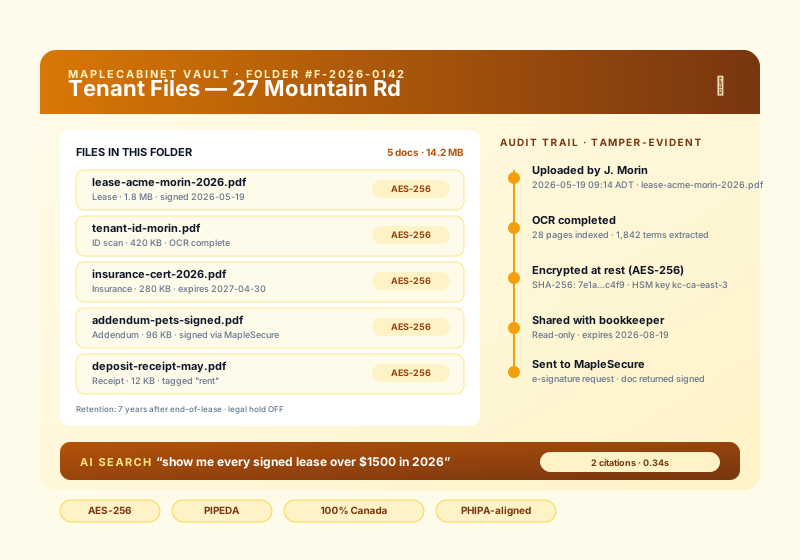
Yes. Every file in MapleCabinet is encrypted at rest with AES-256 and in transit with TLS 1.3. Encryption keys are managed in Canadian HSMs and never leave Canadian infrastructure. Each upload also generates a SHA-256 fingerprint so any modification is detectable.
Is MapleCabinet PIPEDA and provincial health-data compliant?
Yes. MapleCabinet is built around PIPEDA, PHIPA (Ontario health data), and equivalent provincial privacy acts. Data residency is Canada-only, with no replication to U.S. infrastructure. Pro and Business plans include compliance reports for auditors and legal hold for active litigation.
How do retention policies and legal hold work?
You can set retention rules per folder (e.g. "keep tenant leases for 7 years after end-of-lease, then auto-delete") or apply legal hold to freeze files during an audit or lawsuit. The system enforces the rule automatically and writes every retention or hold event into the tamper-evident audit log.
How does AI search and tagging work?
MapleCabinet reads, OCRs, and indexes every file you upload - including scanned PDFs and Word docs. You can search by file name, file content, or ask natural-language questions like "show me every signed lease from 2025 over $1500 a month." On Pro and Business plans, semantic AI search returns ranked answers with citations to the source documents.
Does MapleCabinet integrate with MapleSecure and MapleMail?
Yes. You can send any file from MapleCabinet to MapleSecure for legally binding e-signatures, and signed PDFs flow back into the same cabinet folder. You can also attach files to MapleMail threads directly, or auto-archive incoming MapleMail attachments into a MapleCabinet folder by sender or tag.
Are there file size limits?
Free accounts cap individual uploads at 25 MB. Solo allows 100 MB, Pro allows 500 MB, and Business allows up to 5 GB per file (useful for video evidence, CAD files, and full database backups). All plans support unlimited file count up to the plan storage cap.
Who is MapleCabinet for?
MapleCabinet is built for Canadian SMBs that take their files seriously: clinics, law firms, accountants, property managers, contractors, and any sole proprietor who needs documents stored securely, found instantly, and ready for an audit. If you keep contracts, leases, receipts, or patient records, it replaces the shared drive and the metal filing cabinet both.
Where is my data stored?
All MapleCabinet data is stored in Canadian datacenters with 100% Canadian data residency. Files, backups, and encryption keys never leave Canadian infrastructure and are never replicated to U.S. or offshore servers. This is what keeps MapleCabinet PIPEDA-aligned by default.
What file types can I upload to MapleCabinet?
MapleCabinet accepts PDFs, Microsoft Word, Excel, and PowerPoint files, plain text, scanned images (JPG, PNG, TIFF), and most common business file formats. Scanned PDFs and images are run through OCR so their text becomes fully searchable, and large formats like video evidence, CAD files, and database backups are supported on higher plans.
Can I drag and drop whole folders into MapleCabinet?
Yes. You can drag and drop individual files or entire folders, and MapleCabinet preserves your folder structure on the way in. Every file is encrypted with AES-256 the moment it lands, then OCR-indexed and auto-tagged in the background.
How do I move my existing documents into MapleCabinet?
The fastest way to migrate is to drag and drop your existing folders straight into MapleCabinet, which keeps your folder tree intact and indexes everything automatically. There are no per-document import fees, and unlimited file count is included on every paid plan up to your storage cap.
How does secure sharing and access control work?
You share folders and files with granular, per-person permissions: view-only, download, or edit. Access can be revoked at any time, and every share, open, download, and change is written to a tamper-evident audit log so you always know who touched a document and when.
What is recorded in the MapleCabinet audit log?
MapleCabinet keeps a tamper-evident audit log of every meaningful event: uploads, views, downloads, edits, shares, version rollbacks, retention changes, and legal holds. Each entry records who did it and when, which is exactly the trail a compliance officer or auditor expects to see.
Does MapleCabinet keep previous versions of my files?
Yes. Every save creates a new version, so you can roll back to any prior state or compare versions. You can also freeze a snapshot under legal hold so a document cannot be altered or deleted while an audit or lawsuit is active.
Can MapleCabinet read and search scanned paper documents?
Yes. MapleCabinet runs OCR over scanned PDFs and images, turning paper you photographed or scanned into fully searchable text. You can then search by file content or ask natural-language questions and get ranked answers with citations back to the source page.
How much does MapleCabinet cost?
MapleCabinet starts free for up to 10 documents. Paid plans are Solo at $9, Pro at $19, and Business at $39 CAD per month, with storage scaling from 10 GB up to 250 GB and AI semantic search included on Pro and Business. All plans include AES-256 encryption, Canadian data residency, audit logs, and full-text search. A charity rate is available on request.
Is there a free plan or trial?
Yes. The Free plan lets you store up to 10 documents with AES-256 encryption, Canadian data residency, full-text PDF search, and a 30-day audit trail, with no credit card required. You can upgrade to a paid plan at any time without losing any files or history.
Can I cancel or export my data if I leave?
Yes. You can cancel any time, and your documents are always yours. Because files keep their original formats inside MapleCabinet, you can download them back out whenever you need to, with no lock-in and no export fee.
Is MapleCabinet suitable for healthcare and patient records?
Yes. MapleCabinet is built around PIPEDA and PHIPA (Ontario health data) and equivalent provincial privacy acts, with Canada-only data residency, AES-256 encryption, granular access control, and a tamper-evident audit log. Pro and Business plans add compliance reports for auditors and legal hold for active matters.
Is MapleCabinet Canadian-owned and hosted in Canada?
Yes. MapleCabinet is part of MapleWorkSuite, a Canadian product designed and owned in Canada (Joel & Nanz Inc., New Brunswick). Your data is hosted in Canada, billing is in CAD, and the platform is built with PIPEDA in mind — no surprise cross-border data on your business.