What is MapleTax?
MapleTax is the Canadian-built tax preparation app inside MapleWorkSuite. It organizes your tax records and prepares T1 personal returns, T2125 self-employment statements, T2 corporate returns, and HST/GST returns for Canadian individuals and small businesses. It generates the CRA forms, schedules, and GIFI ready to import into a certified platform (such as UFile or TaxCycle) or hand to your accountant -- MapleTax does not file your return directly. It integrates with MapleExpense (receipts auto-populate deductions), MapleInvoice (revenue lines roll into T2125 and T2), and MapleBuy (HST/GST collected on sales fans out to the right CRA boxes by province). Priced in CAD, with basic features free.
How is MapleTax different from TurboTax, SimpleTax (Wealthsimple Tax), and H&R Block?
TurboTax and H&R Block are US-headquartered desktop-era products that charge $40-$80 CAD per T1 return and treat self-employment and corporate returns as expensive upsells. SimpleTax/Wealthsimple Tax is free for simple T1 but does not handle T2 corporate, charges $40 for the Plus tier, and offers no built-in expense or invoice integration. MapleTax is end-to-end preparation: T1 + T2125 + T2 + HST/GST in one app, integrated with the rest of MapleWorkSuite (so receipts, invoices, and sales tax flow in automatically), Canadian-hosted with PIPEDA data residency. We publish the actual CRA forms we generate so you can sanity-check them line-by-line, then import them into a certified platform or hand them to your accountant to file. Note: unlike the consumer products above, MapleTax does not file your return directly -- it prepares and exports it.
Does MapleTax file my return with the CRA?
No. MapleTax is not NETFILE-certified and does not file or e-file your return. It organizes your records and generates CRA-ready output: a T1 General worksheet with all provincial and territorial schedules, and T2 corporate schedules including GIFI (General Index of Financial Information) schedules 100, 125, and 141, plus Schedule 50 for shareholders. You then import that into a certified platform like UFile or TaxCycle, or hand it to your accountant or a CRA-registered EFILE preparer to file. MapleTax includes an export/handoff workflow to make that step easy, but the actual filing is done by you, your accountant, or a registered preparer.
Does MapleTax handle sole-proprietor T2125 and corporate T2 returns?
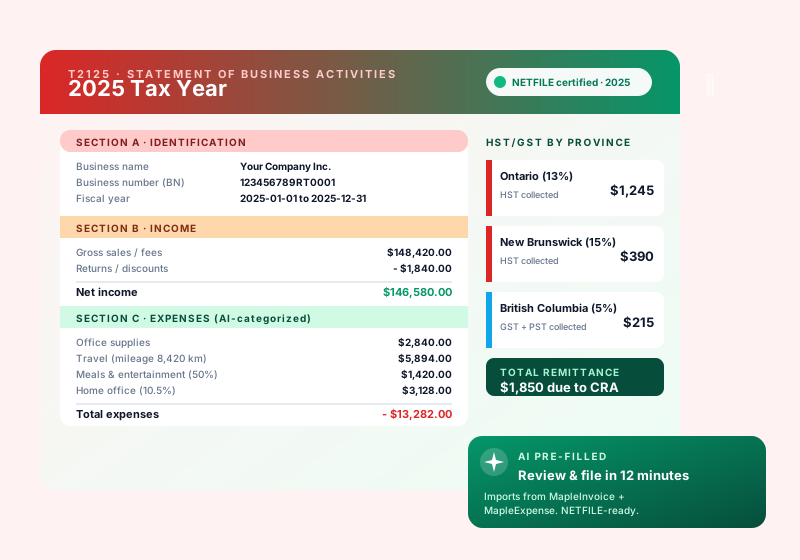
Yes - this is one of the biggest gaps in consumer tax software, and MapleTax is built around it. Sole proprietors get a guided T2125 Statement of Business or Professional Activities with auto-imported receipts and mileage from MapleExpense and MapleDrive, vehicle-expense pro-ration, home-office calculator (workspace-in-home), and CCA (Capital Cost Allowance) tracking across years. Incorporated small businesses get a guided T2 with GIFI schedules, SR&ED-friendly expense categorization, Small Business Deduction (SBD) calculator, CCPC (Canadian-Controlled Private Corporation) status worksheet, and Schedule 50 shareholder reporting. Family tax planning (income splitting via T1206, RESP/RRSP optimization) is included on the Pro and Business tiers.
Does MapleTax prepare my HST/GST return and handle different provincial rates?
Yes. MapleTax includes a province-aware HST/GST return generator that pulls sales tax collected from MapleBuy and MapleInvoice and pre-fills the GST34 (or RC7200 for selected listed financial institutions). Provincial rates are handled automatically: 5% GST in Alberta, BC, NU, NT, YT, SK, MB; 13% HST in Ontario; 15% HST in NB, NL, NS, PE; plus 9.975% QST stacked on 5% GST in Quebec via a parallel QST schedule. Quick Method election is supported with the right remittance rate per province. MapleTax does not file the return for you -- you export the completed return as a PDF for your bookkeeper or accountant, or file it yourself through CRA My Business Account.
How does MapleTax handle capital gains, DTC (Disability Tax Credit), and RRSP optimization?
Capital gains: full Schedule 3 support including dispositions of real estate (with principal-residence exemption tracking via T2091), publicly traded securities, crypto (yes, the CRA treats it as property), and small business shares with Lifetime Capital Gains Exemption (LCGE) tracking. The 50% inclusion rate is applied automatically and we surface the 2024 mid-year rate change (66.67% above $250k threshold) where applicable. DTC: full T2201 workflow including practitioner certification PDF generation, retroactive ten-year adjustment requests, and transfer to a supporting family member. RRSP: the AI optimizer pulls your CRA notice-of-assessment contribution room (with your consent), projects marginal-tax-rate savings across the next three years, and tells you exactly how much to contribute - and whether to defer the deduction - before the March 1 deadline.
How much does MapleTax cost in CAD?
Basic tax-prep features are free. Paid tiers (under pricing review) add capability, all priced in CAD with no FX markup, charged per tax season (not per return): Free ($0) for simple T1 prep under the Canadian Basic Personal Amount with up to three T-slips; Solo - one T1 with unlimited T-slips, RRSP optimizer, AI deduction finder, and audit-trail PDF; Family - up to five linked T1 returns with income splitting (T1206, pension splitting), DTC transfer, RESP optimizer, and the MapleExpense connector; Pro (Most Popular) - everything in Family plus T2125 self-employment, HST/GST prep, mileage tracker, home-office calculator, and MapleInvoice + MapleBuy connectors; Business - everything in Pro plus T2 corporate prep with full GIFI schedules, SBD calculator, CCPC worksheet, and Schedule 50 shareholder reporting, plus an export/handoff workflow to a CRA-registered EFILE preparer who files for you. MapleTax itself does not file your return.
Is MapleTax PIPEDA-compliant and where is my tax data stored?
Yes. All tax records, T-slips, receipts, supporting documents, and the audit trail are stored exclusively on Canadian-hosted infrastructure in the Maritimes and Central Canada with end-to-end encryption at rest and in transit. We align with PIPEDA, Quebec Law 25 (Bill 64), and provincial privacy acts. Your tax data is never sent to third-party AI providers and never used to train external models. MapleTax does not transmit returns to the CRA -- it generates CRA-ready output that you import into a certified platform or hand to your accountant to file. Subjects can exercise access, correction, and deletion requests through a self-serve portal that returns within the statutory thirty-day window, and full seven-year audit retention is maintained to satisfy CRA record-keeping requirements (subsection 230(4) of the Income Tax Act).
Should I claim vehicle mileage or just write off fuel?
It depends on how the vehicle is owned, and mileage often wins. If the vehicle is personally owned and used for business, claiming the CRA per-km mileage allowance usually beats writing off fuel alone -- especially for a thirsty (high L/100 km) vehicle -- because the per-km rate also covers maintenance, insurance, and depreciation, not just gas. If the vehicle is company-owned, you do not use per-km at all; instead you claim actual operating costs plus CCA (depreciation). Set this up at /finances/mileage/vehicles by adding the vehicle, its L/100 km, the ownership type, and the claim method, then tag your fuel receipts to it so the app can compare the two approaches with your real numbers.
How do I claim vehicle mileage?
Go to /finances/mileage/vehicles and add your vehicle. Enter its fuel consumption (L/100 km), set ownership to personal, set the claim method to mileage, and enter the business kilometres you drive per fiscal year. Then tag each fuel receipt to that vehicle. With the L/100 km and your fuel receipts, the app predicts kilometres driven, and your trip entries substantiate the business-use percentage. The CRA per-km allowance is then applied to your business kilometres. The mileage allowance is paid to you per business km (tax-free to you) and is deductible to the business.
Where do I enter my vehicle and fuel receipts?
Everything lives at /finances/mileage/vehicles. Add each vehicle with its L/100 km, set its ownership (company or personal) and claim method, and set the business kilometres per fiscal year. Then tag each fuel receipt to its vehicle so the app knows which gas belongs to which car. Tagging is also what keeps your numbers clean: once a personal vehicle is on mileage, its tagged fuel is automatically excluded from your expense totals so you do not deduct the same cost twice.
Company-owned vs personally-owned vehicle -- what is the difference?
The claim method follows ownership. A personally-owned vehicle used for business is claimed with the CRA per-km mileage allowance: the business reimburses you per business kilometre, which is tax-free to you and deductible to the business. A company-owned vehicle is claimed with actual operating costs plus CCA (depreciation) -- you cannot use the per-km method on a company-owned vehicle. Set the correct ownership at /finances/mileage/vehicles; for a company vehicle also set the CCA class and the capital cost so the depreciation pool is tracked.
What is CCA / UCC and how does it carry forward?
CCA (Capital Cost Allowance) is how you deduct the cost of a capital asset, like a company-owned vehicle, a little each year instead of all at once. The remaining undepreciated value is the UCC (Undepreciated Capital Cost) pool. Each year you claim CCA the pool goes down, and whatever is left carries forward to the next year automatically -- so the deduction continues over the life of the asset. To track this, set the vehicle's ownership to company at /finances/mileage/vehicles and enter its CCA class and capital cost.
What is a non-capital loss carry-forward?
A non-capital loss happens when your deductible business expenses for a year exceed your income for that year. That loss is not wasted -- it carries forward and can offset income in future years, reducing tax in a later year's return (for a corporation, a later T2). Reassessed prior-year figures feed this, so getting your prior years entered correctly pays off in later years. Keeping vehicle, fuel, and other expenses recorded accurately is part of making sure the right loss is available to carry forward.
Why do I need mileage logs?
Mileage logs are your audit defense. The CRA can disallow vehicle costs entirely if there are no logs to back up the business use. A log establishes the business-use percentage of the vehicle. At /finances/mileage/vehicles the app helps build this for you: it predicts kilometres from your tagged fuel receipts (fuel divided by L/100 km) and combines that with the trips you enter, so you end up with the substantiation the CRA expects. No logs means no proof, which puts the deduction at risk.
Is there a free plan for MapleTax?
Yes. MapleTax offers a free account so you can start with no credit card and no commitment. Create your free account, explore the core features, and upgrade to a paid plan only when you need more volume or advanced capabilities.
Is MapleTax Canadian-owned and hosted in Canada?
Yes. MapleTax is part of MapleWorkSuite, a Canadian product designed and owned in Canada (Joel & Nanz Inc., New Brunswick). Your data is hosted in Canada, billing is in CAD, and the platform is built with PIPEDA in mind — no surprise cross-border data on your business.